Syntax
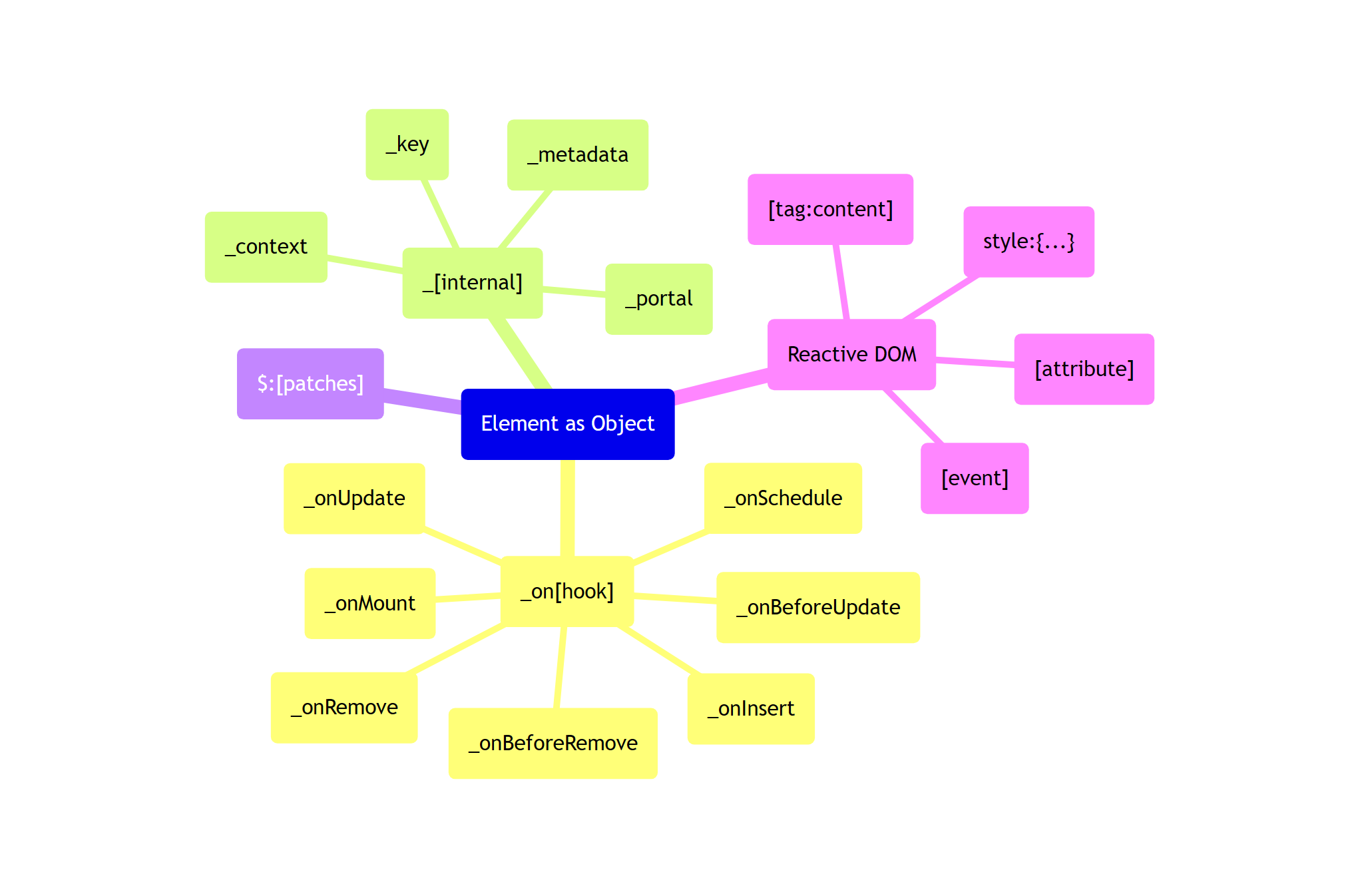
A Domphy element is a plain JavaScript object. The first key is the tag name; the value of that key is the element content.
{
  div: "Hello",
  class: "hero",
  style: { color: "red" },
  onClick: (event, node) => console.log(node.tagName),
}
Tag And Content
The first key must be a valid lowercase HTML tag name such as div, button, input, ul, or svg.
{ div: "Hello" }
{ button: "Save" }
{ ul: [{ li: "One" }, { li: "Two" }] }
The tag value is the content:
stringornumberbecomes a child text nodearraybecomes multiple childrenfunction(listener)becomes reactive contentnullis used for void tags such asinputorimg
{ p: "Static text" }
{ p: 42 }
{ ul: [{ li: "A" }, { li: "B" }] }
{ p: (listener) => `Count: ${count.get(listener)}` }
{ input: null, type: "text" }
If the content is reactive, the function is re-run whenever a subscribed state changes. See Reactivity.
Attributes
Any non-reserved key is treated as an attribute.
{ input: null, type: "text", placeholder: "Enter name" }
{ button: "Save", disabled: true }
{ div: "Panel", ariaLabel: "Settings panel" }
Attribute names are written in JavaScript-friendly form:
- standard HTML attributes use normal identifiers like
type,value,placeholder - attributes that are hyphenated in HTML are usually written as camelCase so you do not need string keys
- examples:
acceptCharset,ariaLabel,ariaControls,httpEquiv,tabindex - SVG-specific typed attributes that are naturally camelCase, such as
viewBox, stay camelCase
{ form: null, acceptCharset: "utf-8" }
{ button: "Open", ariaControls: "menu-1" }
{ svg: [{ path: null, d: "..." }], viewBox: "0 0 24 24" }
For data-* attributes, prefer the camelCase object form:
{ div: "Item", dataState: "open" }
{ div: "Item", dataId: "123" }
Attribute values can also be reactive:
{ button: "Save", disabled: (listener) => loading.get(listener) }
For imperative attribute reads and writes after node creation, see AttributeList API.
Style
style is a CSS-in-JS object using camelCase CSS properties plus nested selectors.
{
  div: "Hello",
  style: {
    color: "red",
    fontSize: "14px",
    "&:hover": { color: "blue" },
    "@media (max-width: 768px)": { fontSize: "12px" },
  },
}
Rules:
- CSS properties are camelCase, not kebab-case
- nested selectors use keys like
&:hover,& > span,&[data-open=true] - at-rules such as
@media,@supports,@container,@keyframes, and@font-faceare allowed - style values can be reactive functions
{
  div: "Hello",
  style: {
    color: (listener) => active.get(listener) ? "red" : "gray",
    "& .label": { fontWeight: 600 },
    "@supports (backdrop-filter: blur(4px))": {
      backdropFilter: "blur(4px)",
    },
  },
}
Domphy handles style generation and mounting through ElementNode; StyleList is not the main public API path.
Events
Native DOM events use the same names you expect from HTML and JSX-style APIs, but written as camelCase keys like onClick, onInput, onKeyDown, onTransitionEnd.
{
  button: "Save",
  onClick: (event, node) => {
    console.log(event.type)
    console.log(node.tagName)
  },
}
Rules from the source:
- the key must start with
on - the rest of the name must match a supported DOM event in camelCase form
- the handler receives the native event as the first argument
- the current
ElementNodeis passed as the second argument
That second node parameter is the main difference from raw DOM listeners.
{
  input: null,
  onInput: (event, node) => {
    const value = (event.target as HTMLInputElement).value
    node.setMetadata("lastValue", value)
  },
}
If you need to add listeners imperatively, see ElementNode API.
Hooks
Hooks use the _on prefix to distinguish them from native DOM events.
{ div: "Hello", _onMount: (node) => console.log(node.domElement) }
This naming boundary is important:
onClickis a DOM event_onMountis a Domphy lifecycle hook
Available hooks include Schedule, Init, Insert, Mount, BeforeUpdate, Update, BeforeRemove, and Remove.
{
  div: "Hello",
  _onInsert: (node) => console.log(node.parent),
  _onBeforeRemove: (node, done) => {
    node.domElement!.animate([{ opacity: 1 }, { opacity: 0 }], { duration: 200 }).onfinish = done
  },
}
Hook timing, arguments, and usage are covered in Lifecycle.
Patches
$ applies one or more patches to the host element.
{ button: "Submit", $: [button(), loading({ open: true })] }
A patch is a function returning a PartialElement. Domphy merges patch output into the element before rendering.
Patch composition and merge rules are explained in Overview.
Internal Keys
These keys are reserved for Domphy runtime behavior:
{
  div: "Hello",
  _key: "user-1",
  _context: { role: "admin" },
  _metadata: { id: 123 },
  _portal: () => document.body,
}
_key: stable identity for list reconciliation_context: inherited data for descendants_metadata: local data attached to this node only_portal: redirects DOM rendering to another mount target
For _portal, see Portal.
_key
_key is only for diffing during reactive child updates.
const List = {
  ul: (listener) => items.get(listener).map(item => ({
    li: item.name,
    _key: item.id,
  })),
}
When Domphy updates a child list, _key tells the reconciler which new input matches which existing child.
- it is not a DOM
id - it is not
node.nodeId - it is not general-purpose metadata
- it is only the reconciliation key for child diffing
If the key matches, Domphy reuses the existing node instance and DOM node instead of creating a new one.
Use _key when rendering dynamic lists whose items can reorder, insert, or remove during reactive updates.
Not To Do
- Do not write deeply nested inline objects when the subtree is more than a small local fragment; extract child elements into named variables or functions and compose them in the parent array instead.
const Header = { header: "Title" }
const Body = { section: "Content" }

const App = {
  div: [Header, Body],
}
- Do not quote object keys unless the syntax really requires it; use normal identifiers such as
div,ariaLabel,dataId,onClick, and_onMount, and only use quoted keys for CSS selectors or at-rules insidestyle.
{
  button: "Save",
  ariaLabel: "Save changes",
  dataId: "save-button",
  style: {
    "&:hover": { opacity: 0.8 },
  },
}
- Do not treat one large inline object as a template language; break repeated or meaningful subtrees into variables, functions, or components so the structure stays readable.
Summary
| Key Pattern | Meaning |
|---|---|
[tag] | HTML tag key, lowercase |
[attribute] | HTML or SVG attribute |
style | Nested CSS-in-JS object |
on[Event] | Native DOM event handler |
_on[Hook] | Domphy lifecycle hook |
$ | Patch list |
_key, _context, _metadata, _portal | Reserved internal keys |