
Reactivity
Domphy uses listener-based reactivity. Any value can be a function that receives a listener. When a subscribed state changes, Domphy re-runs only that reactive part.
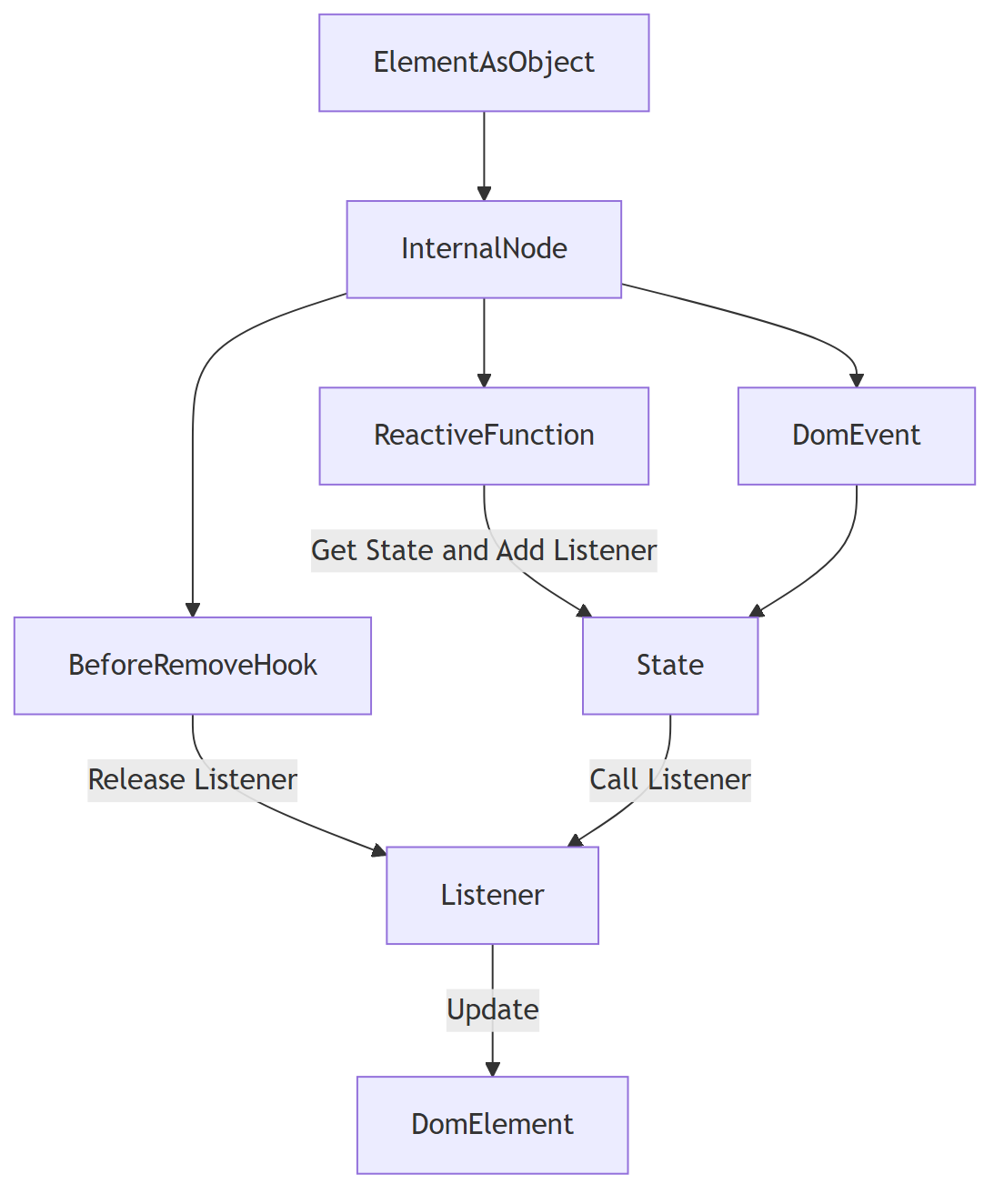
const count = toState(0)

const counter = {
  button: (listener) => `Count: ${count.get(listener)}`,
  onClick: () => count.set(count.get() + 1),
}count.get(listener) does two things:
- returns the current value
- subscribes that reactive function to future changes
Subscriptions are released automatically when the node is removed.
import { type DomphyElement, toState } from "@domphy/core";
import { themeColor, themeSpacing } from "@domphy/theme";

// Create a State instance
const count = toState(0);

const text: DomphyElement<"p"> = {
  // Reactive values can be reactive functions.
  // Reading state with `count.get(listener)` also add listener to state.
  // State change => call listener => re render property
  p: (listener) => `Count: ${count.get(listener)}`,
};

const button: DomphyElement<"button"> = {
  button: "Increment",
  onClick: () => count.set(count.get() + 1),

  // Deliberate solid fill: a fixed shifted background is exactly what
  // "tone-background-inherit" flags — suppress it like button({variant:"solid"}) does.
  _doctorDisable: "tone-background-inherit",

  // Standard Nested CSS nesting
  style: {
    padding: `${themeSpacing(1)} ${themeSpacing(4)}`,
    backgroundColor: (listener) => themeColor(listener, "shift-9", "primary"),
    borderRadius: themeSpacing(1.5),
    color: (listener) => themeColor(listener, "inherit", "primary"),
    "&:hover": {
      backgroundColor: (listener) => themeColor(listener, "shift-7", "primary"),
    },
  },
};

const App: DomphyElement<"div"> = {
  div: [text, button],
};

export default App;Attributes
Reactive attributes are already fine-grained. When the state changes, Domphy updates only that attribute.
const open = toState(false)

const button = {
  button: "Toggle",
  ariaExpanded: (listener) => open.get(listener),
  disabled: (listener) => !open.get(listener),
}This does not re-create the node. It only updates the affected DOM attributes.
Use reactive attributes for:
disabledhiddenvaluearia-*data-*- any attribute whose value should track state directly
CSS Props
Reactive CSS properties are also fine-grained. Domphy updates only the specific CSS declaration that changed.
const active = toState(false)

const box = {
  div: "Hello",
  style: {
    color: (listener) => active.get(listener) ? "red" : "gray",
    opacity: (listener) => active.get(listener) ? 1 : 0.5,
  },
}This is different from re-rendering the whole node. The existing style rule stays mounted; only the changed CSS properties are updated.
Use reactive style props when:
- the element itself stays the same
- only visual state changes
- you want the smallest possible DOM/CSS update
Children Update
Reactive children are more complex than attributes or CSS props. When the child function runs again, Domphy calls children.update(...) and reconciles the child list.
const items = toState([
  { id: 1, name: "A" },
  { id: 2, name: "B" },
])

const list = {
  ul: (listener) => items.get(listener).map(item => ({
    li: item.name,
    _key: item.id,
  })),
}Default Rerender
For light children such as text or simple unkeyed content, the default reactive child update is usually enough.
const count = toState(0)

const app = {
  p: (listener) => `Count: ${count.get(listener)}`,
}This is the simplest form and should be the default choice for simple text children or lightweight child trees.
Fine-Grain With _key
When children are dynamic lists, _key gives Domphy a reconciliation identity.
const list = {
  ul: (listener) => items.get(listener).map(item => ({
    li: item.name,
    _key: item.id,
  })),
}_key is used only for child diffing. If the key matches, Domphy reuses the existing node instance and DOM node instead of creating a new one.
Use _key when:
- items can reorder
- items can insert in the middle
- items can be removed from the middle
- child instances carry important runtime behavior
Without _key, child diffing is more positional.
Fine-Grain With Low-Level API
For the most control, update the child list imperatively through the ElementList API instead of relying on a reactive child function to rebuild the array.
const app = {
  div: [
    {
      button: "Add child",
      _onInit: (node) => {
        node.addEvent("click", () => {
          node.parent!.children.insert({ span: "New child" })
        })
      },
    },
  ],
}Or inside a normal event handler:
{
  button: "Add child",
  onClick: (_, node) => {
    node.parent!.children.insert({ span: "New child" })
  },
}This is also fine-grained:
insert()creates only the new childremove()removes only that childmove()reorders existing childrenswap()swaps existing children
Use the low-level API when updates are event-driven and local, and when you want explicit control over exactly which child changes.
Derived Reactivity
The (listener) => state.get(listener) form is the foundation: an explicit listener subscribes a reactive part to a state. On top of it, Domphy ships derived primitives — computed, effect, effectScope, batch, untrack, and flushSync — for computations that depend on other reactive values. They build on the same Notifier machinery, so they participate in the same flush and cycle detection as a plain state.get.
These primitives auto-track: a reactive read with no explicit listener inside a computed or effect subscribes automatically. The explicit (l) => state.get(l) path used in elements is unchanged — both work, and they compose.
import { toState } from "@domphy/core"

const a = toState(1)
const b = toState(2)computed
computed(fn) is a lazy, cached derived value. fn runs on first read and the result is cached; it re-evaluates only after a tracked dependency changes — never on every read. A computed is read like a state: c.get() for the current value, c.get(listener) to subscribe, and (l) => c.get(l) to bind it in an element.
computed returns a Computed<T>, which satisfies ReadableState<T>:
export interface Computed<T> {
  readonly _isState: true;
  readonly _notifier: Notifier;
  get(listener?: ValueListener<T>): T;
}The _notifier property holds the internal dependency-tracking node. It is part of the public interface but intended for advanced integrations; normal usage only needs get(listener?).
import { computed } from "@domphy/core"

const sum = computed(() => a.get() + b.get()) // auto-tracks a and b

sum.get() // 3 — computes and caches

const view = {
  p: (listener) => `Sum: ${sum.get(listener)}`, // re-runs only when sum changes
}When a dependency changes, the computed recomputes and notifies its own downstream listeners only if the new value differs by === from the cached one. An identical value short-circuits, so unchanged derivations cause no downstream churn.
effect
effect(fn) runs fn immediately, auto-tracking every reactive read inside it, and re-runs it whenever any tracked dependency changes. It returns a dispose() that releases all subscriptions.
import { effect } from "@domphy/core"

const stop = effect(() => {
  console.log("a + b =", a.get() + b.get())
})
// logs immediately, then re-runs whenever a or b changes

stop() // unsubscribeEach run re-collects dependencies, so reads no longer reached — for example behind a branch that is now false — are dropped automatically.
effectScope
effectScope() returns an EffectScopeHandle that groups reactive resources so they can be disposed together. Anything created inside scope.run(fn) — effects, computeds, listeners, and nested scopes — is owned by the scope, and scope.stop() tears the whole group down in one call.
import { effectScope } from "@domphy/core"
import type { EffectScopeHandle } from "@domphy/core"

const scope: EffectScopeHandle = effectScope()

scope.run(() => {
  effect(() => console.log(a.get()))
  effect(() => console.log(b.get()))
})

scope.stop() // disposes both effects (and any nested scope) at oncebatch
batch(fn) coalesces every state write inside fn into a single downstream flush, so dependents react once instead of once per write.
import { batch } from "@domphy/core"

batch(() => {
  a.set(10)
  b.set(20)
})
// effects / computeds depending on a and b re-run a single timeuntrack
untrack(fn) runs fn and returns its result without registering its reads into the currently active collector. Use it to read a state inside an effect or computed without making it a dependency.
import { untrack } from "@domphy/core"

effect(() => {
  // Re-runs when `a` changes, but NOT when `b` changes.
  console.log(a.get(), untrack(() => b.get()))
})flushSync
flushSync() drains the entire pending reaction queue synchronously before returning. Normally Domphy schedules flushes via microtask; flushSync forces all queued notifier flushes and reactive re-runs to complete immediately. Use it in tests or imperative code where you need the DOM/state to be fully settled before reading it back.
import { toState, flushSync } from "@domphy/core"

const count = toState(0)
count.set(1)
flushSync()
// count.get() === 1 and all downstream effects/computeds are already settledIf a diverging reactive loop prevents settling, flushSync breaks after 10 000 iterations and logs a console.error.
watch
watch(source, callback, options?) tracks a reactive source and calls callback(newValue, oldValue) whenever the source produces a new value. Unlike effect, it gives you both the new and the previous value.
source can be:
- A
State<T>orComputed<T>(anything with.get()) - A getter function
() => T— compose multiple reads into one expression
Returns a dispose() that stops watching and releases all subscriptions.
import { toState, watch } from "@domphy/core"

const count = toState(0)

const stop = watch(count, (newVal, oldVal) => {
  console.log(`changed from ${oldVal} to ${newVal}`)
})

count.set(1) // logs: "changed from 0 to 1"
count.set(2) // logs: "changed from 1 to 2"

stop() // unsubscribeWatch a derived expression (getter function):
const a = toState(1)
const b = toState(2)

const stop = watch(
  () => a.get() + b.get(),
  (sum, prev) => console.log(`sum: ${prev} → ${sum}`)
)

a.set(10) // logs: "sum: 3 → 12"Pass { immediate: true } to invoke the callback immediately on setup (the initial oldValue will be undefined):
watch(count, (n, prev) => console.log(n, prev), { immediate: true })
// called immediately: logs current count, undefinednextTick
nextTick(fn?) returns a Promise<void> that resolves on the next microtask — after scheduled reactive effects have processed. Use it when you need to read updated state or the DOM immediately after a write, without calling the synchronous flushSync().
import { toState, nextTick } from "@domphy/core"

const count = toState(0)
count.set(1)

await nextTick()
// reactive effects triggered by count.set(1) have run by nowOr pass a callback:
count.set(42)
nextTick(() => {
  console.log("after flush:", count.get()) // 42
})State utilities
isState
isState(value) is a type guard that returns true when value is a State<T> or any ReadableState<T> (including Computed<T>). Use it when writing utilities that accept either a raw value or a reactive source.
import { isState, toState } from "@domphy/core"

const count = toState(0)

isState(count)   // true
isState(42)      // false
isState("hello") // falseTyped usage:
function getValue<T>(src: T | ReadableState<T>): T {
  return isState(src) ? src.get() : src
}readonly
readonly(source) wraps a State<T> or ReadableState<T> in a read-only view. The returned object exposes only .get() — callers cannot call .set(). Use it to expose state from a module without granting external write access.
import { toState, readonly } from "@domphy/core"

const _count = toState(0)

// Expose read-only; consumers can subscribe but not mutate
export const count = readonly(_count)
export const increment = () => _count.set(_count.get() + 1)The returned ReadableState<T> is compatible everywhere a state is accepted as a reactive source — including (l) => count.get(l) bindings in elements, computed(fn), watch(source, ...), etc.
External State Systems
Domphy does not enforce a state architecture. Any system that can call a function works:
store.subscribe(() => listener())   // Zustand
atom.subscribe(() => listener())    // Nanostores
count$.subscribe(() => listener()) // RxJSNot To Do
- Do not create reactive update loops where one reactive read immediately feeds an event that writes the same source again without a clear boundary.
const text = toState("")

const field = {
  input: null,
  value: (listener) => text.get(listener),
  onChange: (event) => text.set((event.target as HTMLInputElement).value),
}- Do not think of this as two-way binding; treat it as one-way data flow instead, where state drives the view and events explicitly write the next state.
const text = toState("")

const field = {
  input: null,
  value: (listener) => text.get(listener),
  onInput: (event) => {
    text.set((event.target as HTMLInputElement).value)
  },
}- Do not move ordinary form synchronization into hooks; keep it in flat event handlers such as
onInput,onChange, oronClickso the read path and write path stay visible.